Pages

  • Twitter
  • Facebook
  • Google+
  • RSS Feed
Showing posts with label Tech. Show all posts

Sunday, September 8, 2013


Over the last 15 years, IT jobs have constantly been solid, well-paying jobs event through recessions, but as technologies constantly constantly change, the specific disciplines of IT professionals vary drastically. If you're thinking about going into IT or are already in the field and want to know which specific IT job you should go for, this infograhpic can help by showing which IT jobs are the best paying and fasted growing in today's economy.

Wednesday, August 28, 2013


Buffer started as a simple web a pp for buffering your tweets to be sent out throughout the say automatically.

The idea was that not every part of the day is perfect to tweet, and also that sending to many tweets one after the other might put off your followers. Such things don't sound personal use, but if you are tweeting on your companies behalf then it's a different story.


Buffer has grown a lot since then and lets you manage your Twitter, Facebook and Linked in accounts, all at the same time. But the best part is that Buffer offers apps for iOS, Android, browser extensions and is even integrated into many other services across the web, like: Pocket, Feedly, Instapaper, and most recent Followerwonk.

Wednesday, July 17, 2013


Available for: Windows, Mac, iOS, Android, BlackBerry, Windows Mobile.
SugarSync was released as a competitor to Dropbox, which is still the most well-known solution for online data backup and synchronization. Bus as it turns out, SugarSync does stand apart in this niche by providing some great features. First of all, SugarSync apps are real. This means that each app allows you to do any standard operation on your files, and not just view them line in some Dropbox apps.
Secondly you can synchronize any folder on your computer, not just one, and you can even synchronize stuff selectively. For example, some folders can be synchronized both on your desktop and your laptop, while others can stay laptop-exclusive.
Thirdly, it's just as automatic and hands-free as Dropbox, so you don't even notice it working in the background.

Friday, June 28, 2013


Evernote is one of those application that you either get or struggle to understand. In brief, Evernote has a text editor, photo upload tool, and a voice recording device, and you can use any of those core components separately or in combination, to upload content to your account. The program saves all your thoughts, notes, recipes, photos -- whatever you upload -- in the cloud so that you can get them from your computer, smartphone, tablet, or really anywhere you have internet connection and a browser with Evernote's Web App.

Monday, June 24, 2013


Well place Rainmeter skins, a great wallpaper, and some fresh taskbar icon makes it a cool desktop. I f you want to get the tools that the user used visit Lifehacker

Saturday, June 22, 2013


This days we receive hundreds of emails in a short period of time, however not all email is important or worth reading. Sometimes you just want to group up your emails in an orderly manner. Worry not, that's where Sanebox comes in. Sane box organizes your email so you don't have to spend a lot of time going through and reading all you emails.

Saturday, June 15, 2013

Your desktop is like your house. It can say a lot about you. It can tell if you are organised, what you like, what kind of person you are. Staring today we will be featuring desktops that are cool and some tips on how to build them.

The first desktop mod is the Winter Desk. This desktop was created using windowsblind's Abcisse Vista  created by amaeli.

Saturday, June 1, 2013


Web/Android: SnapPea already offers a window app that makes managing your phone form your computer easy. Now they've unveiled SnapPea web, which lets you send SMS messages, your photos, and more form the comfort of your browser, no extra cost required.

The app gives you some but not all the of the futures the SnapPea desktop app does:you can send and receive SMS messages from from you browser so you don't have to pick up your phone and read or reply to text messages, manage your photos and contacts, install or uninstall app you have on your phone, and more. You phone and your browser pair via Wi-Fi so you have to have them both on the same wireless LAN for SnapPea to work.

SnapPea isn't the only app that gives you these services. AirDroid, offers many of the same features, and recently did away with the requirement to have your phone and your PC on the same network in order to manage it.

Friday, May 31, 2013


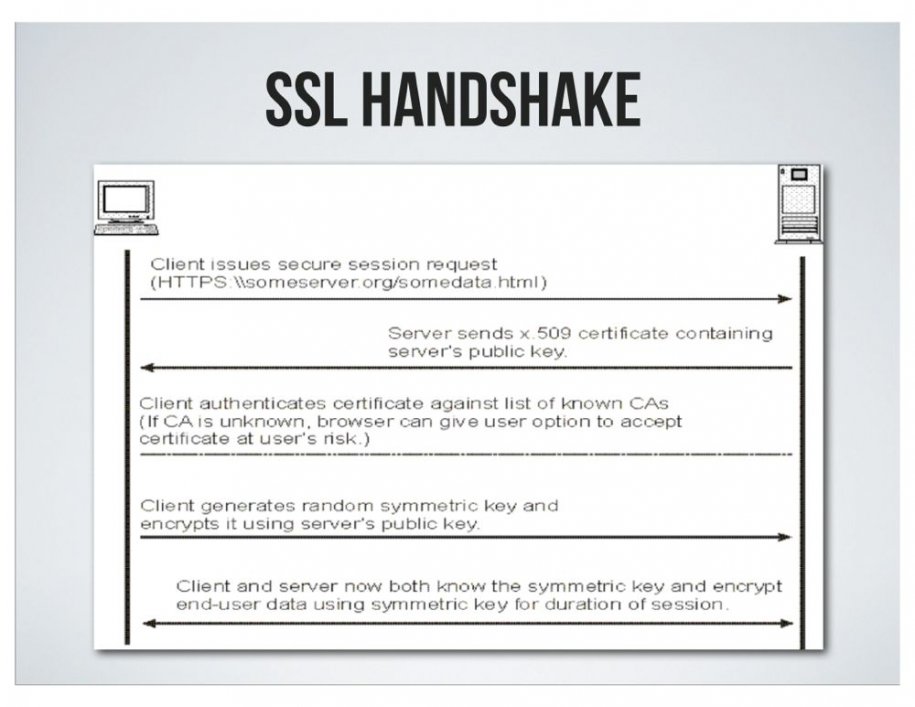
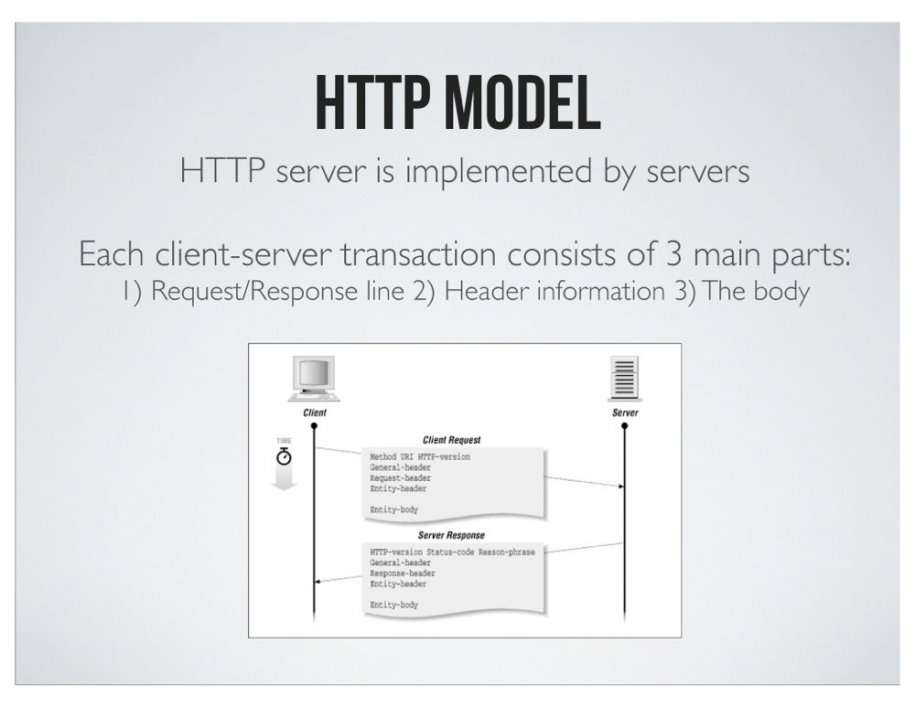
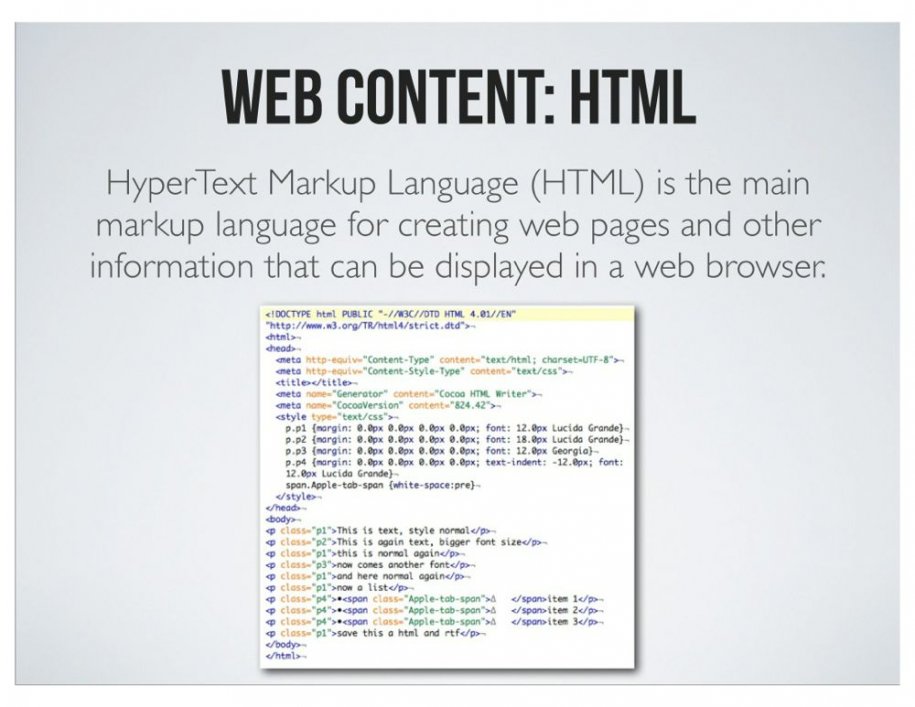
Lemi Ergin a principle engineer at Sony has done non-technical people in the internet industry a favour. He made a presentation called "Fundamentals of the Web for Non-Developers."

He says the purpose of the deck is to educate "business people" on "concepts of and web applications," "understand how web-based software works," and "understand technical discussions better."

Here is the presentation.


© 2012. Design by Main-Blogger - Blogger Template and Blogging Stuff